
 Built for Woocommerce
 Background Processing
 Supports 10 import languages
 Secure & Reliable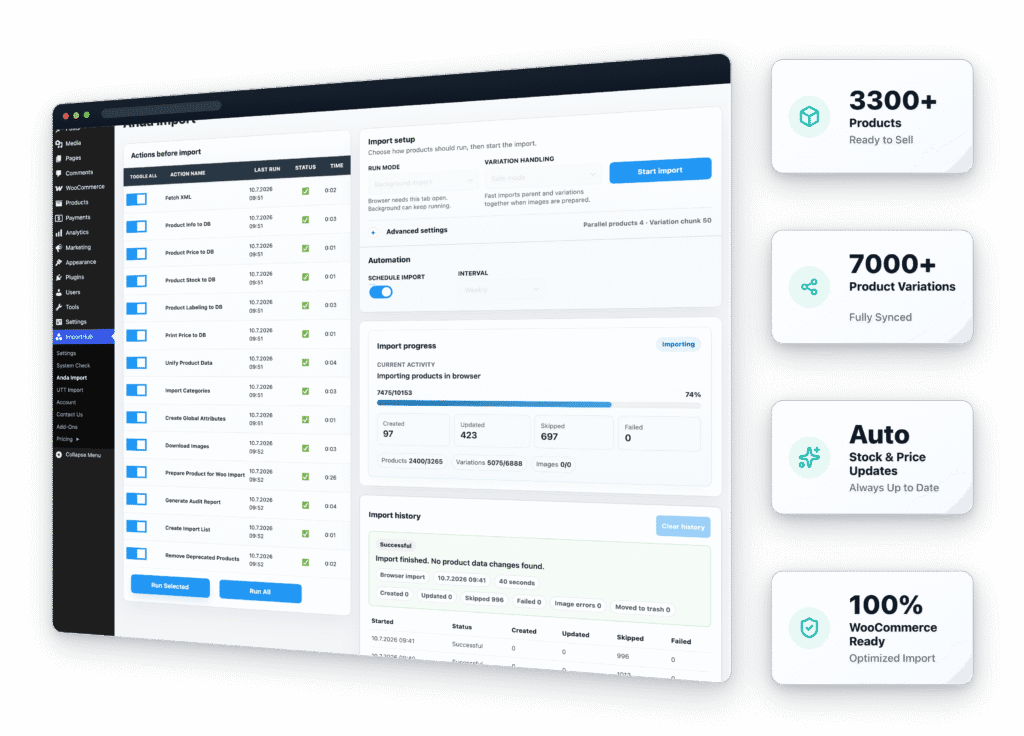




Import Large Anda Present Catalogs in a Few Steps
ImportHub handles the full Anda workflow automatically — from products and variations to stock, pricing, images, and categories.

Anda Present
Supplier Catalog

ImportHub
Import Engine

Products
Prepared Automatically

WooCommerce
Store Synchronization

Automatic Sync
Stock u0026amp; Price Updates
![]() No manual product creation
No manual product creation![]() No XML field mapping
No XML field mapping![]() No duplicate image downloads
No duplicate image downloads
 No manual product creation
BACKGROUND IMPORTS
Import Thousands of Products Without Keeping the Browser Open
Run scheduled Anda imports in the background and keep products, stock, pricing, and images synchronized automatically.
- Continue imports after closing the browser
- Schedule automatic synchronization
- Track import progress and status
- Built for large Anda Present catalogs
PRODUCT-LEVEL CONTROL
Take Control Over Individual Product Updates
Exclude specific WooCommerce products from price updates or automatic synchronization when you need custom pricing, local stock management, or manual product control.
- Disable automatic price updates per product
- Exclude products from synchronization
- Keep custom WooCommerce pricing
- Manage selected products manually
PRINTING INFORMATION
Show Available Printing Options
Display available print positions and supported printing methods directly on WooCommerce product pages.
- Visual preview of available print positions
- Supported printing technologies for each position
- Maximum print size and number of colors
- Product-specific printing options
LOCALIZATION & PRICING
Import Products in 10 Languages With Automatic Pricing Rules
Import Anda Present catalogs in your selected language and automatically apply global pricing margins across imported WooCommerce products.
- Import products in 10 supported languages
- Apply global percentage-based margins
- Keep pricing synchronized automatically
- Update existing products in the selected language
Built Specifically for Anda Present Catalogs
Unlike generic import plugins, Anda Import is designed specifically for Anda Present catalogs and automated WooCommerce synchronization.
| Generic Import Plugins | ANDA Import |
|---|---|
| ❌ XML/CSV mapping required | ✅ Ready-to-use Anda Present integration |
| ❌ Manual attribute configuration | ✅ Automatic product & variation setup |
| ❌ Generic workflows for any supplier | ✅ Background & scheduled imports |
| ❌ Difficult variation handling | ✅ Product-level synchronization control |
| ❌ Manual synchronization setup | ✅ Automatic stock & pricing updates |
Choose the Right Import Workflow for Your Store
Start with manual imports or fully automate your Anda Present synchronization with scheduled background imports.
Manual Import Workflow
ImportHub + Anda Import – BASIC- Updates for 1 month
- Support for 1 month
- Manual browser import Run product imports manually whenever needed.
- Unlimited product imports
- Import products in 10 languages
- Smart image handling
- Category exclusion rules
Fully Automated Synchronization
ImportHub + Anda Import – ADVANCED- Updates for 1 month
- Support for 1 month
- All ImportHub + ANDA Import – BASIC plan features
- Scheduled automatic imports Keep products, stock, and prices updated automatically.
- Background imports Imports continue even after closing the browser tab.
- Automatic stock synchronization
- Product-level update control
Manual Import Workflow
ImportHub + Anda Import – BASIC- Updates for 1 year
- Support for 1 year
- Manual browser import Run product imports manually whenever needed.
- Unlimited product imports
- Import products in 10 languages
- Smart image handling
- Category exclusion rules
Fully Automated Synchronization
ImportHub + Anda Import – ADVANCED- Updates for 1 year
- Support for 1 year
- All ImportHub + ANDA Import – BASIC plan features
- Scheduled automatic imports Keep products, stock, and prices updated automatically.
- Background imports Imports continue even after closing the browser tab.
- Automatic stock synchronization
- Product-level update control

14-day 100% Money-back Guarantee
You are fully protected by our 100% Money Back Guarantee. If during the next 14 days you experience an issue that makes the plugin unusable and we are unable to resolve it, we’ll happily offer a full refund of your money.
SATISFIED CLIENTS
Here’s What Our Customers Have to Say
Frequently Asked Questions
No. Anda Import is built specifically for Anda Present catalogs and includes a ready-to-use import workflow without manual XML or CSV field mapping.
Yes. The Advanced plan supports background imports that continue processing even after the browser tab is closed.
Yes. You can disable automatic price updates or completely exclude selected WooCommerce products from synchronization.
Yes. Anda Import supports importing catalogs in 10 supported languages.
Yes. You can apply a global pricing margin to imported products or disable automatic price updates for selected products and manage pricing manually.
Anda Import is designed for large catalogs and performs best on modern hosting environments. We recommend at least 2 CPU cores, 4 GB RAM, and sufficient PHP memory limits. Larger catalogs may benefit from VPS or cloud hosting for faster import processing.
The initial import can take several hours, depending on your server performance and internet connection. The first import must download and process all product images while creating thousands of products and variations in WooCommerce.
Once the initial import is complete, subsequent imports and synchronizations are significantly faster because existing products, variations, and images are reused whenever possible. Only new or changed data needs to be processed.
Not yet. We plan to add support for automated order synchronization and submission in a future release.
Yes we do! We stand behind the quality of our product and will refund 100% of your money if you experience an issue that makes the plugin unusable and we are unable to resolve it.
For more details, please review our Refund Policy.
No, we currently do not offer a trial version.
Yes, you can utilize a single license for Live/Production, Staging, Dev, and Localhost Sites as long as your domain name clearly indicates it is a development or staging site. Our system is designed to automatically recognize specific domains and subdomain conventions associated with staging or development environments.
Yes, if you ever decide that this isn’t the best plugin for your business, simply cancel your account from your Account panel.
If your license expires, the plugin will stop working and you will no longer receive updates or support. However, all products that were previously imported into WooCommerce will remain in your store and will not be deleted. Only the import and synchronization functionality will be unavailable until the license is renewed.
Absolutely! You can upgrade or downgrade your plan at any time.
Yes! Top-notch customer support is key for a quality product, so we’ll do our very best to resolve any issues you encounter. Note, each plan provides a different level of support.
Yes, we can! If the plugin doesn’t work perfectly with your theme, another plugin, or a unique use case, we’re happy to help with customization. Whether it’s a small adjustment or a more specific functionality you need, feel free to contact us and share the details.
More pre-sale questions? Visit our complete FAQ page or contact us.
Need help?
Our team are on hand to provide fast, helpful, and professional support.