
This section lets you control where and how the floating video widget appears on the screen. Adjust position, margins, timing, and aspect ratio to best fit your site’s layout.
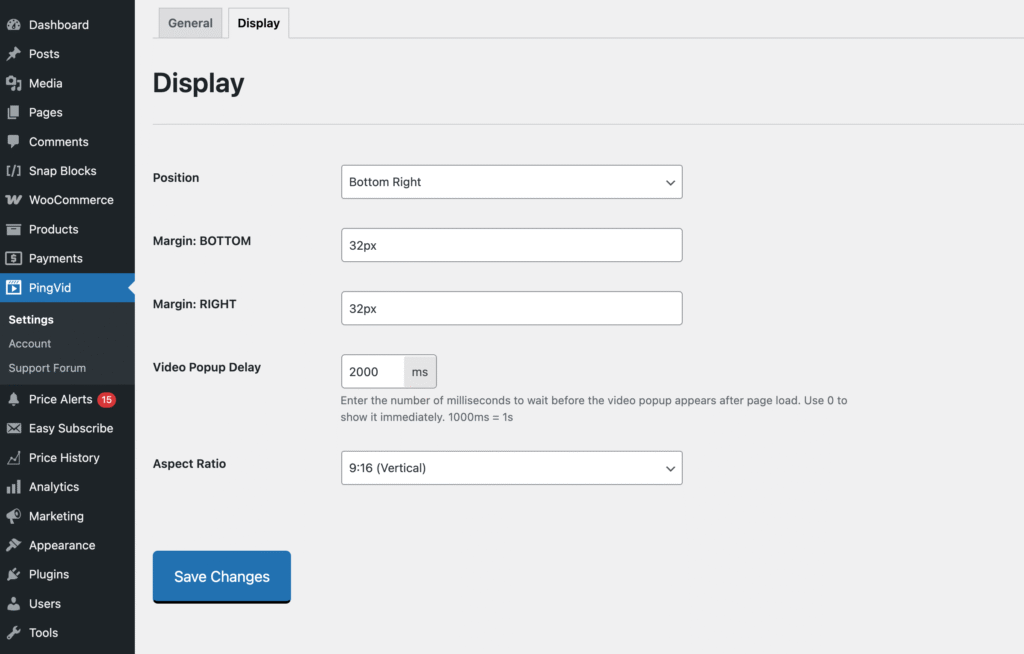
Position
Choose the corner of the screen where the video widget will appear:
- Top Left
- Top Right,
- Bottom Left
- Bottom Right
Margin
Margins adjust dynamically depending on the selected position. For example, if you choose Bottom Right, the settings will apply to the bottom and right sides of the screen.
You can enter any valid CSS size value, such as: 2rem, 32px, 5%, etc.
Video Popup Delay
Enter the number of milliseconds to wait before the video popup appears after page load.
- 0 = show immediately
- Any positive number = delay in milliseconds
Reminder: 1000ms = 1s
Aspect Ratio
Select the aspect ratio for the video wrapper. Choose the one that best fits your video format. If you’re not sure which ratio to use, experiment with the available options until the video looks correct on your site.
Available options:
- 16:9 (Widescreen) – Standard for most YouTube videos.
- 4:3 (Standard) – Older video format, rarely used on YouTube.
- 1:1 (Square) – Sometimes used for embedded or social-style videos.
- 9:16 (Vertical) – Ideal for YouTube Shorts.