
The General settings control how ANDA Import connects to the ANDA product feed, which products and stock sources are included, and how imported product prices are calculated.
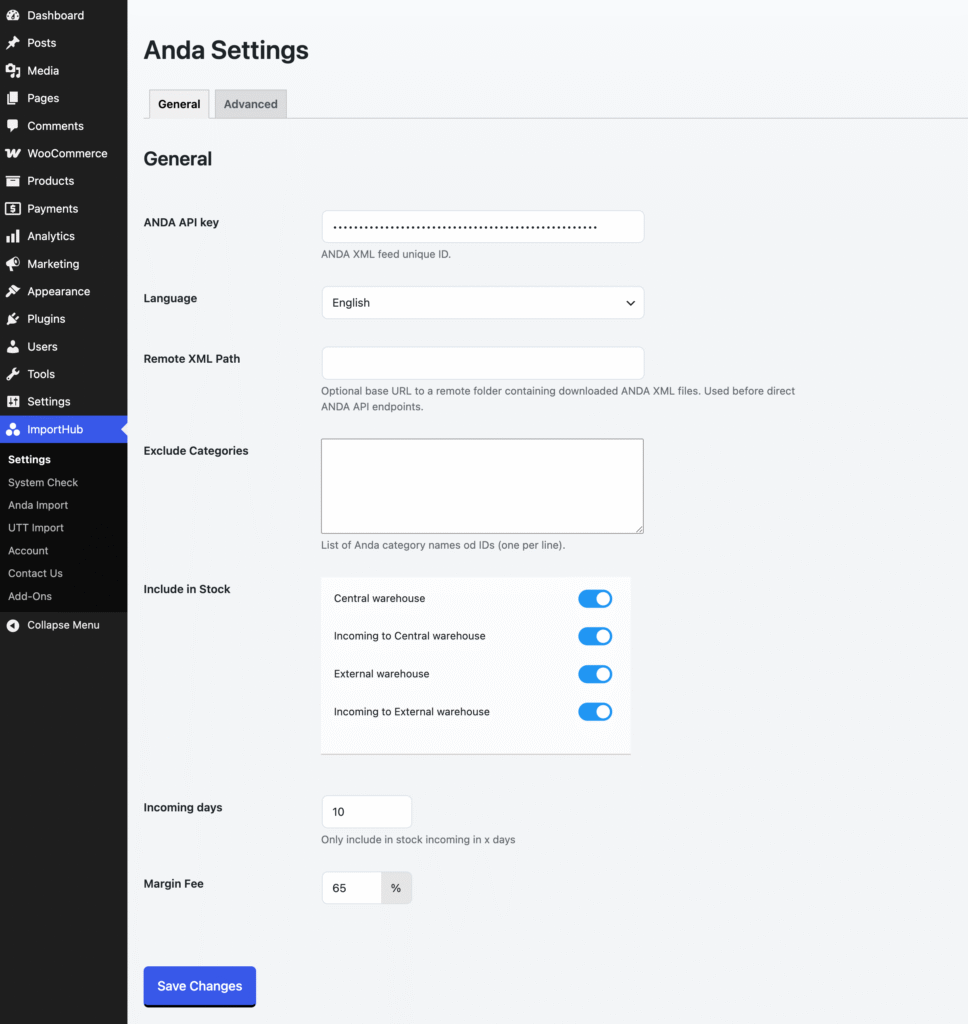
ANDA API Key
Enter your ANDA XML feed unique ID. This is used to connect to ANDA and download the product, price, stock, category, and other required XML data.
You can obtain your unique ID from ANDA.
Language
Select the language used for imported product data.
ANDA Import uses the selected language for product names, descriptions, categories, attributes, and other localized information provided by ANDA.
Supported languages:
- English
- Hungarian
- German
- Italian
- French
- Dutch
- Czech
- Polish
- Romanian
- Slovak
If you change the language after products have already been imported, the next full import will update the relevant product information to the newly selected language.
Remote XML Path
Optionally enter the URL of a remote directory containing previously downloaded ANDA XML files.
When configured, ANDA Import will use the XML files from this location instead of downloading them directly from the ANDA API.
In most cases, this field should be left empty. It is primarily intended for development, testing, or server configurations where direct access to the ANDA XML feeds is not available.
Exclude Categories
Enter ANDA categories that you do not want to import. Add one category per line.
You can use either the ANDA category name or category ID. Products belonging to excluded categories will be skipped during the import.
Include in Stock
Choose which ANDA stock sources should be included when calculating WooCommerce product stock.
Available stock sources are:
- Central warehouse – Stock currently available in ANDA’s central warehouse.
- Incoming to Central warehouse – Stock expected to arrive at the central warehouse.
- External warehouse – Stock currently available in an external warehouse.
- Incoming to External warehouse – Stock expected to arrive at an external warehouse.
Disable any stock source that you do not want to include in the WooCommerce stock quantity.
Incoming Days
Defines how far into the future incoming stock should be included in the available product stock.
For example, if this value is set to 10, only incoming stock expected to arrive within the next 10 days will be included.
This setting applies to the enabled Incoming to Central warehouse and Incoming to External warehouse stock sources.
Margin Fee
Automatically increase imported product prices by a percentage. For example, a margin fee of 50% will increase a €10 supplier price to €15.