
Search for “floating video WordPress” and you’ll find plugins that pop up a video the moment the page loads, plugins that pin a small video player to a screen corner and leave the rest of the page alone, and plugins that only turn “floating” once you scroll past an embedded video. All three get called floating, and some get called sticky too. One widget’s own product description makes the mix-up obvious: it calls its scroll-triggered behavior sticky, floating, and picture-in-picture style, all in the same sentence.
That’s not a naming quirk you can safely ignore. These are three different mechanisms with three different effects on a visitor, and picking the wrong one for what you actually want to do is the most common way this feature goes wrong. Here’s what each one is, and how to tell which one fits your site.
The three things “floating video” can mean
Video popup or lightbox
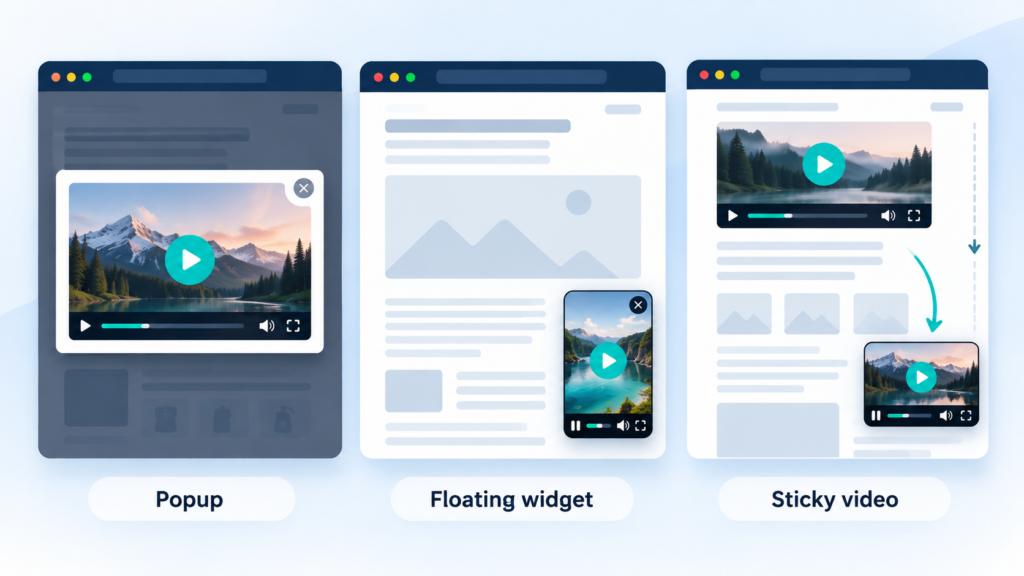
A popup opens over the whole page, usually triggered by a page load, a click, or an exit-intent signal, and the rest of the content stays hidden behind it until the visitor closes it or finishes watching. Plugins like Video Popup and WP Video Popup on WordPress.org work this way, and WonderPlugin Lightbox offers the same pattern for a self-hosted or embedded video.
This is the most attention-grabbing option and the most disruptive one. It’s a reasonable choice when the video genuinely is the destination, not a supporting element, such as a trailer or a hero video someone is meant to watch before anything else on the page matters.
Floating video widget (corner-overlay)
A floating widget in the narrower sense is a small video player that appears on its own, usually after a short delay, positioned in a screen corner, and stays there independent of whatever else is in the content. Plugins built specifically for this include Floating Video Widget on WordPress.org, which places a shortcode-triggered video in a fixed corner with an optional close button.
The video isn’t embedded anywhere in your post or product description. It’s a separate, persistent overlay that the visitor can watch, ignore, or close, while the rest of the page works normally underneath it.
Sticky video (scroll-triggered)
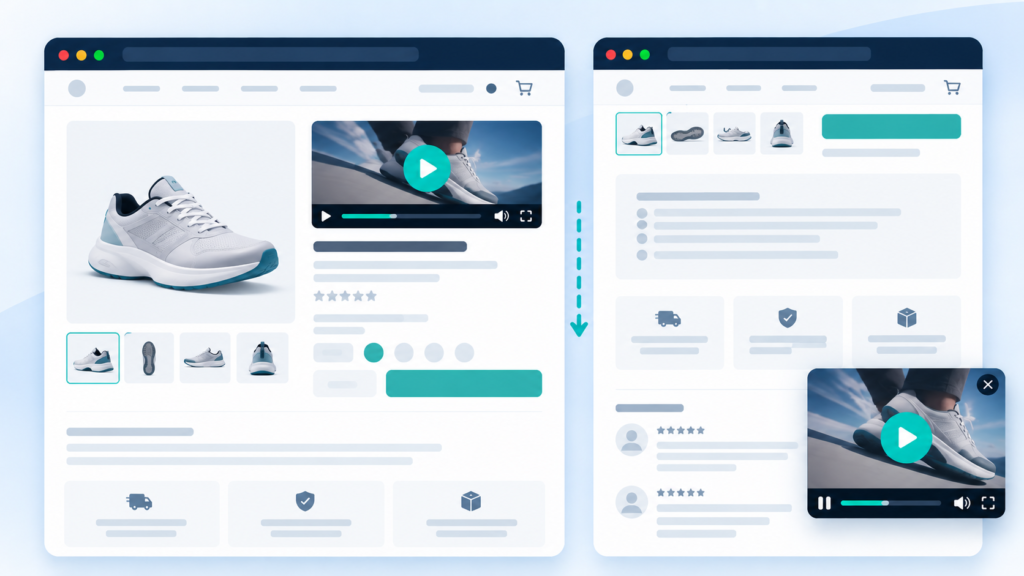
A sticky video starts as a normal embedded video inside your post or page content, sitting wherever you placed it. Scroll past it, and it detaches from that spot and follows you in a corner, still playing. Scroll back up, and it returns to its original position. WPJ Sticky Video, KU Sticky Video for YouTube, and Elementor add-ons like Happy Addons’ sticky video widget and BWD Sticky Video Prime all implement this pattern.
The key difference from a floating widget: there’s no separate overlay video. It’s the same video the visitor already started watching in your content, just relocated so they don’t lose it by scrolling.
| Where it starts | What triggers it | Blocks the page? | |
|---|---|---|---|
| Video popup | Not part of the content flow | Page load, click, or exit intent | Yes, until dismissed |
| Floating widget | Independent overlay, not tied to any content video | Appears on its own after a delay | No |
| Sticky video | Embedded in your post/page content | Scrolling past the video’s position | No |
Which one actually fits your goal
If the video is secondary content, a promo clip, an announcement, a Shorts- style teaser, a floating widget fits. A fashion store running a short vertical clip from a new collection is a good example: the video sits in a corner while people keep browsing, and nobody has to stop shopping to watch it.
If the video is the main thing you want someone to keep watching while they scroll to read more, sticky video fits, because it’s the same video following the reader rather than a second one competing for attention. A WooCommerce product page with a short demo video is a good fit for this: the shopper starts the demo, scrolls down to compare specs or read reviews, and the video keeps playing in the corner instead of disappearing off-screen.
If the video deserves the visitor’s full attention before anything else, a trailer, an explainer they need to watch before proceeding, a popup can work, but it’s worth knowing what you’re trading for that attention. Google’s guidance on mobile interstitials treats content-blocking overlays that appear right after someone arrives from a search result as a negative signal, though it explicitly exempts small, easily dismissed elements and anything required by law. Google doesn’t single out video popups as their own category, but a full-screen or content-blocking video popup shown immediately on arrival from search can fall into the type of experience that guidance is about.
What actually happens with autoplay
A lot of these plugins market themselves as autoplaying. In practice, that promise runs into real limits set by the browser, not the plugin.
Chrome allows autoplay unconditionally only when the video has no audio track or is muted. Unmuted autoplay works only after a visitor has already interacted with your site, or has built up enough engagement with it that Chrome’s own tracking allows it, so it isn’t something a plugin can count on for a first-time visitor. Safari applies a similar muted-by-default rule and also needs the playsinline attribute on mobile, or the video plays fullscreen instead of inline. If a site wants autoplay to work reliably for someone arriving for the first time, the safe assumption is that the video needs to start muted. A plugin that promises autoplay with sound is describing a best case most visitors won’t get.
This isn’t a plugin limitation to complain about. It’s just how autoplay policy works, and it’s worth knowing before you’re surprised that a video isn’t making sound on load. Any decent implementation of the popup, floating, or sticky pattern should start muted and let the visitor unmute on click, which is also the more considerate default regardless of what the browser allows.
Implementation on WordPress
If you’re already using a page builder, check its add-ons first. Elementor users building sticky video have several purpose-built widgets available through addon packs like Happy Addons and Essential Addons, and BWD Sticky Video Prime specifically. For a floating corner widget or a popup, a dedicated plugin is usually simpler than trying to configure the behavior through generic page-builder elements, since the trigger logic (delay, position, dismiss behavior) is the actual feature you’re looking for.
Whichever pattern you pick, the same handful of settings matter in practice: where it’s positioned or triggered, whether and how the visitor can dismiss it, how long it waits before appearing, and whether it behaves sensibly on a small mobile screen instead of just shrinking a desktop layout.
PingVid as one example of the floating-widget pattern

Devnet’s PingVid implements the floating/corner-widget pattern described above. It’s not a scroll-sticky player and not a blocking popup, so if what you actually want is a video that follows the reader down the page after they scroll past it, a sticky video plugin is the right category instead.
The free version displays one video sitewide, positioned in any of the four screen corners, starting muted and expanding to sound when clicked, with a visitor-closable button. PingVid accepts either a YouTube URL, including Shorts (a 9:16 aspect-ratio preset is built in for that), or a direct URL to an MP4 file, so the video can come from YouTube or from an MP4 hosted in the WordPress Media Library, on a CDN, or anywhere else reachable by URL.
The paid tier adds per-post, per-page, and per-product video overrides, so different content can show a different video instead of the single sitewide default. That override currently supports YouTube only; a direct MP4 per product isn’t available yet.
Deciding
The plugin choice is really a two-step decision. First, figure out which of the three patterns matches what you want a visitor to experience: something they can ignore while browsing, something that follows a video they already started, or something that takes over the screen. Then look for a plugin built specifically for that pattern, rather than one that happens to use the word “floating” or “sticky” in its name. The terminology in this space is loose enough that the name alone won’t tell you which mechanism you’re getting.