
The Notice Bar pops up in a corner of the page right after a customer adds a product to the cart, with their progress toward free shipping, for example “Add 12 € more to get free shipping!”. They see it without opening the cart.
Where: WooCommerce → Free Shipping Label → Notice Bar.
It shows the same goals, texts and design as the progress bar (Progress Bar tab), including the Gift Bar and Discount bars.
Settings
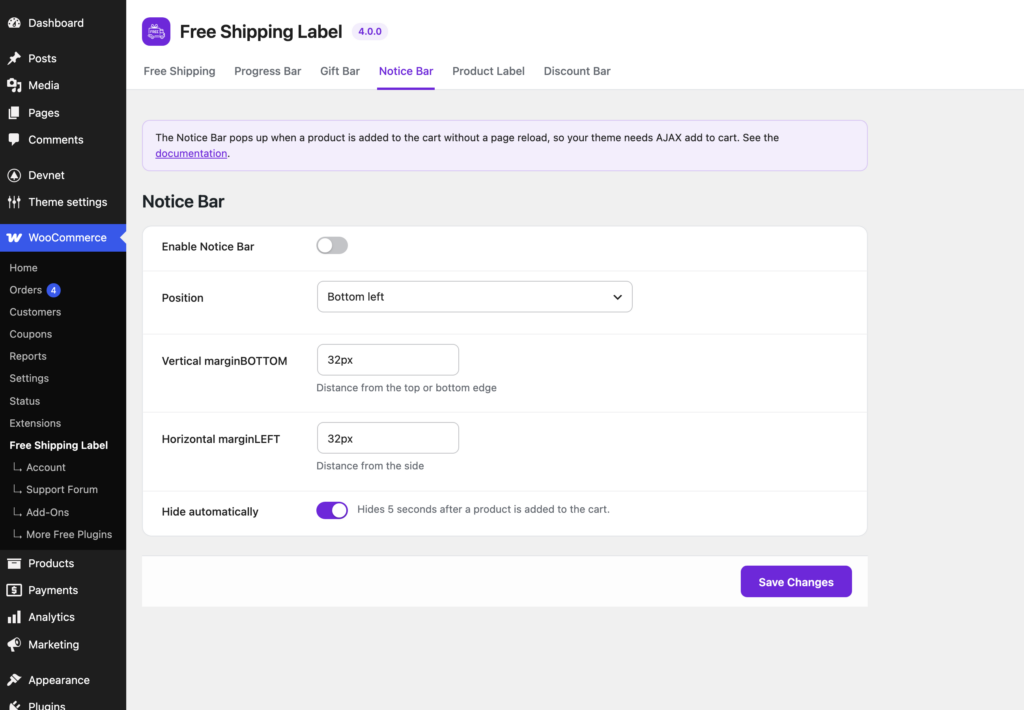
Enable Notice Bar
Turns it on. Off by default.
Position
The corner it pops up in: Top left, Top right, Bottom left (default) or Bottom right.
Vertical margin
Distance from the top or bottom edge of the screen. Default: 32px.
Horizontal margin
Distance from the side of the screen. Default: 32px.
Tip: Increase the margins if the Notice Bar covers a chat button, a cookie banner or a sticky header.
Hide automatically
On by default: the Notice Bar hides 5 seconds after it appears. Turn it off to keep it on screen until the customer closes it (✕).
Note: It appears when a product is added to the cart without leaving the page: the add-to-cart buttons on shop and category pages, block product buttons, and product pages whose theme adds to the cart without reloading. Changing quantities in the Mini-Cart doesn’t open it.